
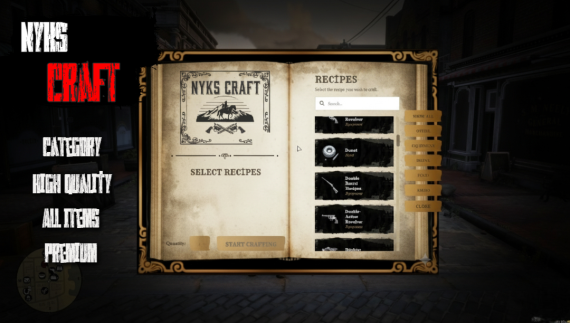
📖 Nyks Craftbook | Advanced VORP Crafting System
Preview video: https://youtu.be/24G493PZqVg?si=aFzVUy26khXaJGOX
Offer your players an unparalleled crafting experience. Nyks Craftbook is a modern, feature-rich crafting script designed exclusively for the VORP framework. With its immersive book interface, advanced features, and fully configurable backend, it provides everything you need to add depth to your server's economy.
This script is fully integrated with nyks_progressbar, showing the player both a configurable animation (via config.lua) and a visual progress bar during the crafting process.
🌟 Core Features
Immersive Book UI: A functional, easy-to-use, and aesthetically rich book interface that will fully immerse your players.
Advanced Discord Webhook Logging: Stay informed about every action on your server. The script logs:
Who crafted what, when, and in what quantity.
Which players failed a craft due to insufficient materials or inventory space.
Who opened the crafting book and when.
All successful and failed attempts are sent instantly to your Discord channel.
Smart Craft Amount Calculation: The interface instantly scans the player's inventory and calculates the maximum amount of an item they can craft. This value is set as the
maxon the quantity input, preventing players from starting an impossible craft.'Tool' & 'Consumable' System: The script supports two types of ingredients for recipes:
Consumables (
remove = true): Items that are removed from the inventory after crafting (e.g., 5 Iron, 2 Cloth).Required Tools (
remove = false): Items that are required to be in the inventory but are not consumed (e.g., Hammer, Blueprint, Tongs).
Weapon & Item Support: Supports crafting for both standard items (
reward) and weapons (usingisWeapon = true). The script automatically handles weight and weapon slot checks viavorp_inventory.Dynamic UI Functions:
Live Search: Players can instantly find the recipe they're looking for, even among hundreds of items.
Categorization: Organize and filter all recipes into custom categories defined in
config.lua(e.g., Food, Equipment, Ammo).
Easy Image Management (
image_folder): Theimage_folderparameter inconfig.luaallows you to organize your images in subfolders withinhtml/images/, such asweapons/orammo/. This is a massive quality-of-life feature when managing hundreds of recipes.Fully Customizable:
config.lua: All recipes, categories, craft times, animations, and webhook settings are easily editable.locales/: The script is fully translatable. You can easily edit all UI text to fit your server's language.
Optimized: The script is optimized on both the client (NUI) and server-side to ensure minimal performance impact.
🛠️ Technical Requirements (Dependencies)
The following resources are required for this script to function correctly:
vorp_corevorp_inventoryoxmysqlnyks_progressbar
🚀 Installation Steps
Place the script files into your
resources/directory.Add
ensure nyks_craftbookto yourserver.cfgfile, after its dependencies.Import the
item.sqlfile into your database. This adds the "Crafting Book" item (crafting_book) to youritemstable.Open
config.luaand changeConfig.WebhookURLto your own Discord webhook URL.Optionally, edit the existing recipes or add your own in
config.lua.Start your server and use the
crafting_bookitem to open the UI.